Bake Pass vs Image
You may have noticed there are two ways (other than the Batch node) to begin a bake. Both the Pass and Output Image Path nodes have a button to start baking.
In a simple tree where a Pass node connects to only one Output Image Path node there is essentially no difference. However if a Pass node connects to more than one Output Image Path node or a Output Image Path has more than one Pass connected things are different.
This will be illistrated in the below example. But the rule is that the ‘Bake Pass’ button (found on the Pass node) will generate only the channels of the outputs they are connected to, not the whole image. While the ‘Bake Image’ button (found on the Output Image Path node) will generate only that image, even if the passes used would normally contribute to multiple images.
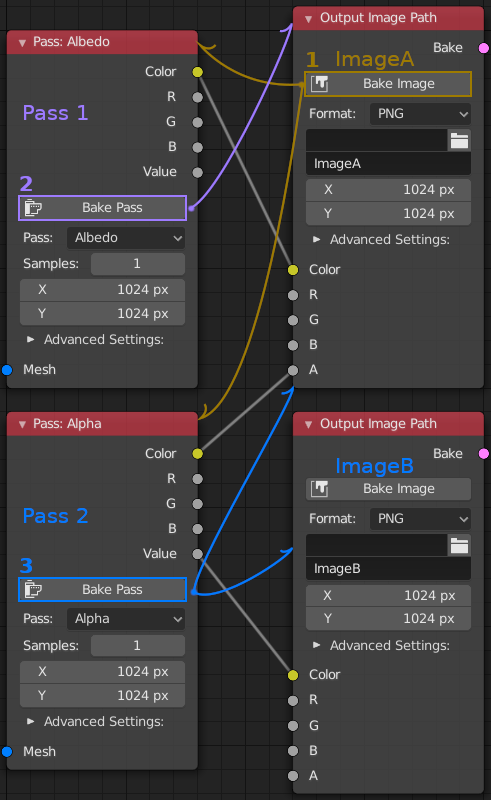
- Pressing the ‘Bake Image’ button on the ImageA (Brown) node would cause Pass1 and Pass2
to both be processed. However ImageB would not be changed even though Pass2 connects
to it.
- Pressing ‘Bake Pass’ on the Pass1 (Purple) node would generate only the Color channel of
ImageA, leaving everything else unchanged.
- While prssing ‘Bake Pass’ on the Pass2 (Blue) node would generate only the Alpha channel of ImageA (leaving Color unchanged). As it is the only input to ImageB, it would also completely generate ImageB.
This can be very useful when you have data packed into different channels of an image and only want to update a specific subset of data. Saving doing unnecessary bakes. It also allows for generating a specific image, while leaving others alone.