Batch Bake
The Batch Bake node simple takes any number of Output Image Path nodes as input (it will continue to expand as sockets are connected). Pressing the ‘Bake All’ button will validate and process all the attached images, generating them in the order they are connected. It also has some additional properties in the side bar explained below.
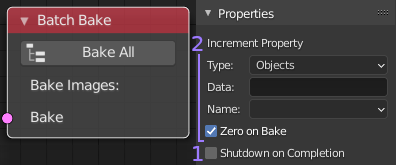
- Shutdown on Completion: Will attempt to power off the system once the batch
has completed. Useful when running very long processes unattended. It should work
fine on Windows systems, but MacOS and Linux require the user to be able to run
‘sudo shutdown’ without entering a password.
- Increment Propery: This is a somewhat advanced feature. Essentially you proide a custom number property which Bake Wrangler will increase by 1 each time it completes one of the batch inputs. The check box will set it to zero at the start if enabled. This would let you change things in the scene between each batch input using drivers connected to the supplied property. This allows for a large degree of automation.