Mesh
The Mesh node is responsible for mesh specific settings and the relationship between objects. It can take Objects nodes as any of its inputs, and outputs to a Pass node. Only objects that are linked to this node will be included in a bake pass and will be completely isolated from all other objects in the .blend file.
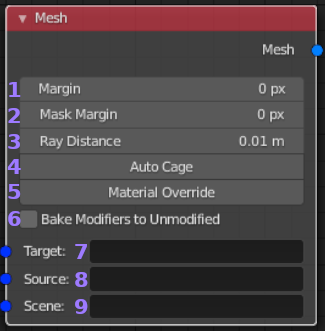
- Margin: Number of pixels to extend out around the edges of
baked UV islands. This is used to prevent bleeding of background
colors into texture island edges when a coordinate lies on a pixel
boundary or when a texture is re-sampled at a different resolution.
- Mask Margin: If masking is enabled this sets how many pixels
the mask should extend beyond the UV islands margin. Normally this
can be set to zero, but is provided in case a mask is cutting off
edges.
- Ray Distance: Sets the distance in blender units that baking rays
should be cast from above the objects surface. This only applies when
baking from one or more Source objects. It needs to be far enough
away to hit any details that extend above the surface of the Target.
When finer control is required a cage object should be specified on
the Target object.
- Auto Cage: This will create a cage for every target object that doesn’t
have it’s own cage specified. When enabled an expansion and smoothing angle
value will appear. The expansion value determines how far out (or in with a
negative value) the cage will be created from the original object. The smoothing
angle is the angle below which normals will be smoothed. Complicated objects
may not result in a good cage and small values for expansion should be used.
- Material Override: This will replace all materials on your objects with
the selected material during baking. Use this to either bake alternative
materials without modifying your scene or to bake your own material based
passes (such as OSL shaders).
- Bake Modifiers to Unmodified: This can be used to bake the effect of a
modifier onto the base object. Mainly this is for convenience and achieves
the same result as duplicating an object, stripping the modifiers you wanted
to bake and then baking the original object onto the stripped version. This
can be useful to bake a bevel modifier for example. It is also possible to
exclude modifiers by disabling their viewport visibility (this behavior can
be inverted in the preferences). If for example you had a mirror modifier
followed by a bevel you would hide the mirror (it will now get applied to
both objects before baking) and leave the bevel visible so that only the
difference created by the bevel would be baked.
- Target: May be a single ‘MESH’ type object or taken from a Objects
node. When a list of objects is used, only ‘MESH’ type objects will be
considered with other types ignored. Each Target will be baked in its
own pass but shares the Mesh nodes settings. At least one valid object
must be selected for a bake to valid.
- Source: Optional field that can take a single object of most types or
a list of objects from a Objects node. All of Source objects will
have their surface data projected onto to the Target(s) (if sensible for
the selected bake pass). Normally a ray distance greater than zero is needed
to capture everything correctly.
- Scene: Optional field that can take a single collection or a list of objects from a Objects node. This is the only input that will consider lights as valid objects. This input is used to set up lighting, shadow casting objects and anything that indirectly influences the pass but isn’t directly mapped to the Target. Generally unless you are trying to capture lighting information this input is not needed.